 버전
1.0.210304
버전
1.0.210304
 패키지명
com.appfour.wearmail
패키지명
com.appfour.wearmail
 카테고리
의사소통과 사회
카테고리
의사소통과 사회
 크기
10.16MB
크기
10.16MB
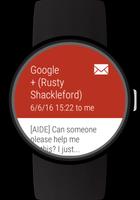
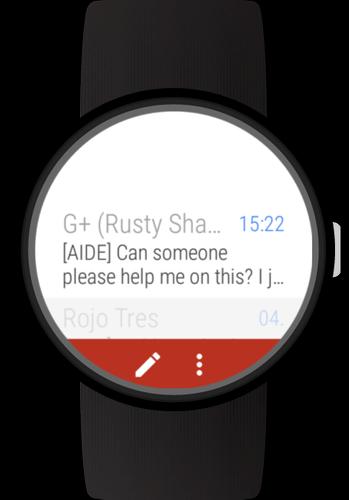
Full featured Mail client for Wear OS watche s
메일받은 편지함, 검색 메일, 첨부 파일보기, 메일에 대한 회신, 전진 메일 및 키보드, 예측 및 이모 지로 메일을 작성하거나 터치 온과 같은 타사 키보드를 사용하십시오. This Android Wear OS mail client brings email on your watch to a new level. Enjoy this dedicated mail for Android Wear client.
Supports standalone access to your email on Android Wear 2 watches paired with iOS or Android phones. For standalone support install the app from the play store on the watch only.
Easy setup:
- Quick sign-in
- Add IMAP account from other mail providers
- Multiple accounts can be added
Mail inbox:
- View your inbox on the watch
- Read whole mail threads, message by message
- Mark mail as read when you open it
- View attachments in mails
- Attached images can be auto-loaded
- 메일 콘텐츠는 Wear Internet Browser (https://play.google.com/store/apps/apps/details?id=com.appfour.wearbrowser)를 사용하여 클릭 가능한 하이퍼 링크를 사용하여 구조화 된 방식으로 표시됩니다.
Mail actions:
- Quick actions for reply, reply all and forward mail
- Quick actions for archive, star and delete mail
- Actions are available for mail cards and inbox mails
Search mail:
- Search mails with keyboard or voice search
Write mail (full version only):
- Reply and reply all
- Forward mail
- Compose new mails
- Search contacts with keyboard or voice search
- Write mails with keyboard or voice input
- Keyboard with text predictions and emojis
- Pre-defined texts
- Keyboard app integration, eg https://play.google.com/store/apps/details?id=com.appfour.wearkeyboard
Cards for new mails:
- Structured mail content
- Mark mail as read if card is swiped out
Customize vibration patterns and sound (full version only):
- Choose "Notification Settings" on new message cards or long press on a message
- Define a specific vibration pattern for the sender of an email, the mail prefix or for all messages of the account
- Define a specific notification sound for the sender of an email, the mail prefix or for all messages of the account
- Choose a pre-defined pattern or record your own pattern
Customize your mail experience (full version only):
- Configure real name and signature
- Configure pre-defined texts
- Configure auto-load images
- Configure mark-as-read
- Configure categories for cards: Primary, Social, Forums, Updates, Promotions
- Configure card style: content length and stack cards
- Custom vibration patterns
The Wear Mail Client is compatible with all Wear OS (Android Wear) smart watches.
예를 들어
- Sony SmartWatch 3
- Motorola Moto 360
- Fossil Q (Explorist, Marshal, Founder, Venture, Wander, ...)
- Ticwatch (E, S)
- Michael Kors (Bradshaw, Sophie, ...)
- Huawei Watch (2, Leo-BX9, Leo-DLXX, ...)
- LG Watch (Urbane, Sport, R, Style, …)
- ASUS ZenWatch (1, 2, 3)
- Samsung Gear Live
- TAG Heuer
... 그리고 더 많은
If your watch is not listed, please check if your Smartwatch runs Wear OS (former Android Wear).





 다운로드 APK(10.16MB)