 버전
11.01.2016
버전
11.01.2016
 패키지명
info.thereisonlywe.onenesspathfinder
패키지명
info.thereisonlywe.onenesspathfinder
 카테고리
정보 읽기
카테고리
정보 읽기
 크기
2.42MB
크기
2.42MB


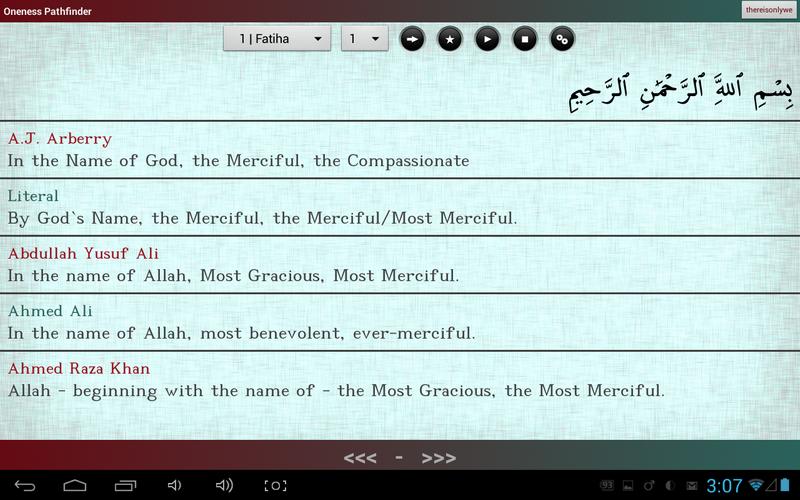
Oneess (Tawhid) 패스 파인더는 꾸란/코란 브라우저/리더입니다.
Oneness Pathfinder 수량에 대한 읽기를 강조하는 섹션 (SURAH) 모델 대신 구절을 이해하는 데 중점을 둔 구절 (AYAH) 모델을 사용합니다. Contrary to its counterparts, it is primarily built for in-depth Quran learning and Quran analysis. You may find features and usage information below.
IMPORTANT: Make sure you have an active internet connection and enough external storage on device before running the program for the first time. All files are saved in external/sd drive under 'thereisonlywe' folder.
[특징]
- Simultaneous multi text view along with Mushaf itself. Translations, transliterations, tafsirs, tawils in different languages written by various people displayed together to uncover verses' meaning. It is highly recommended to open more than one text. Since some words translate better to certain languages, it is also often a good idea to open texts in different languages. You can set texts' display order in settings.
- 광범위한 텍스트 : 알바니아, 암하라, 아랍어, 아제르바이잔, 벵골어, 보스니아, 불가리아어, 중국어, 중국, 체코, 디브 히, 네덜란드, 영어, 프랑스어, 독일, 하우사, 힌디어, 인도네시아어, 이탈리아어, 일본, 한국, 쿠르드어, 로마, 러시아어, 폴란드어, 폴란드어, 폴란드어, 폴란드어, 폴란드어 Sindhi, Somali, Spanish, Swahili, Swedish, Tajik, Tamil, Tatar, Thai, Turkish, Urdu, Uyghur, Uzbek...
- Browser automatically follows reciter (on verse basis).
- Fast navigation within Quran.
- Recitation in the background. You may exit the application or even turn screen off after recitation begins.
- Instant start. You don't need to wait for downloads if you have an active internet connection. Application automatically downloads as it recites.
- Offline recitation. You may choose to download audio packages so that you can use the app without internet access.
- 북마크.
- Similar verses display.
- Text operations: Share, Copy, Search
- Translation recitations.
- Recitation loop. A selection of verses from any section can be recited repeatedly.
- Auto reciter switch (if you weren't able to download all the required audio files from a reciter).
- Pause on phone calls. After phone calls, app recites last verse from the beginning and moves on.
- Responds to headset media buttons (pause, resume, stop).
- Double workspace. You may have two entirely distinct configurations, yet switch between them as easy as clicking on a button.
- Responsive user interface.
[용법]
* After you select texts in settings, you can order them by long clicking.
* In browser, you may long click on words to enter word selection mode to perform text operations.
* Pressing play button recites displayed verse, long clicking it recites displayed section starting from the displayed verse.
* Pressing stop button once pauses recitation, twice stops it.
* Pressing on the bottom bar intelligently pauses recitation after the end of currently recited verse.
* Horizontal arrow button pops up various functions. Long clicking it lets you seek to a specific verse instantly.
- Workspace switch button is the one which reads '1' or '2'.



 다운로드 APK(2.42MB)